
Monday, 12 March 2018
Custom lookup using OnLookup Event Handler in AX7 / D365
To create a lookup on a control (e.g. StringEdit control), override the lookup method or copy the OnLookup event handler of that control. Below is the example of the custom lookup using OnLookup Event Handler in AX7 / D365.


Cancel OOTB validation on data field and field control events in AX7 / D365
In AX7 / D365 like tables, form controls and other element types, form data sources and form data source fields provide framework-level events. Validation events on data field and field controls support invalidating the user-specified values. The following example shows how you can cancel or override validating values on Validate events of form field control or of data fields.
Form data field validation:

From control field validation:

Form data field validation:

From control field validation:

Monday, 5 March 2018
Use of .Net Web Browser control in AX2012 & AX7 / D365
In AX2012 & AX7 / D365 we can use WPF or in general .net controls. Microsoft made a great effort to integrate the .NET environment and AX, not only from a run-time perspective but also for developers, easy event handling and so on. In this example I have add web browser control pro-grammatically and will try to Navigate Website through web browser control.

Reference: Tutorial: WPF User Control for AX2012

Reference: Tutorial: WPF User Control for AX2012
Tuesday, 27 February 2018
Explore metadata search feature in Visual Studio (AX7 / D365)
It is often necessary to find things in the code or to find artifacts. Often times you may not know the name of the metadata element that contains your desired code. Now in AX7 / D365 we can use the Metadata Search tool to perform a complete and faster search in your Application object tree elements.
You can access the Metadata search tool window from the Dynamics 365 > Metadata Search menu command.

By using this feature we can use different types of filters in Visual studio to search our relevant code. You can double-click any result line to navigate to the corresponding X++ code or metadata that matches your search query.
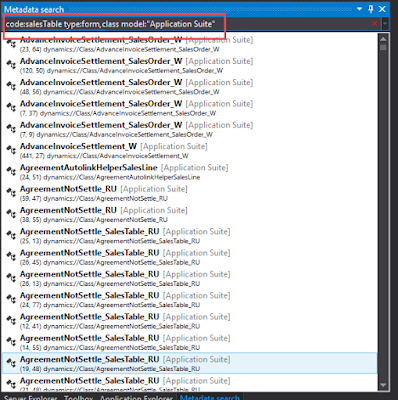
Note: Make sure there should not be any space in between Type values otherwise it will show "Invalid query" error.

You can access the Metadata search tool window from the Dynamics 365 > Metadata Search menu command.

By using this feature we can use different types of filters in Visual studio to search our relevant code. You can double-click any result line to navigate to the corresponding X++ code or metadata that matches your search query.
- Code: – search for a specific code.
- Type: – filter the elements by type.
- Model: – filter the elements by model.
- Name: – filter the elements by name.
- Property: search for element with the property with the specific value.

Note: Make sure there should not be any space in between Type values otherwise it will show "Invalid query" error.

Thursday, 22 February 2018
Using Delegates in AX7 / D365
Delegate methods serve as a means for defining a contract between the delegate instance and the delegate handler. They are widely used by Microsoft to create customization points for customers and partners. It can be very helpful when we want to call something from Model-A in Model-B but we cannot due to referencing. So in this scenario we can use delegates for accessing the artifacts.
Step: 1
Create a delegate method.


Step: 3
Invoke your delegate.

Reference: AX 7. Breaking dependencies
Step: 1
Create a delegate method.

Step: 2
Create a subscriber to your delegate method.
Create a subscriber to your delegate method.

Step: 3
Invoke your delegate.

Reference: AX 7. Breaking dependencies
Thursday, 8 February 2018
Validate Reservation Hierarchy on Validate event in AX7 / D365
Reservation hierarchy is based on the storage and tracking dimensions of items, such as inventory status and license plate. In this blog I will show you how you can validate reservation hierarchy while having storage and tracking dimension. Please see below screen shots of validate methods.


Validate warning is shown below:


Validate warning is shown below:

Wednesday, 7 February 2018
How to get the OOTB Form Object and its methods in Pre / Post Events in AX7 / D365
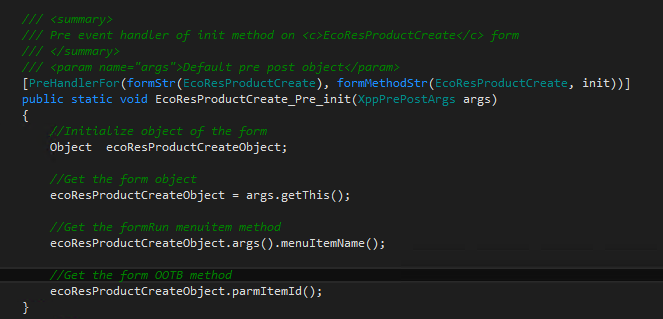
Recently I came across a scenario on which calling from a specific menu item I need to pre-populate some fields on product creation form . When I did some research I found in EcoResProductCreate form that there are already written parm methods in which all I need to do is to pass my value and let parm method do the rest. But for that I need to get the form object and its methods. To achieve this there are two options :
1- Use chain of command
2- Use Event Handlers
In this blog I have used event handler technique. Please see the below screen shot.
Note: When you assign form object to your initialized object, there will be no intellisense shown. So for that you need to explicitly write your desired method.

1- Use chain of command
2- Use Event Handlers
In this blog I have used event handler technique. Please see the below screen shot.
Note: When you assign form object to your initialized object, there will be no intellisense shown. So for that you need to explicitly write your desired method.
Subscribe to:
Posts (Atom)